Annonce

Réduire
Aucune annonce.

problem lacet

Réduire
X
 
  • Filtre
  • Heure
  • Afficher
Tout nettoyer
nouveaux messages

  • X-Plane 10.x problem lacet

    bonjour a tous je suis nouveaux sur le forum et j'ai une grande soucis avec les lacet de toute les avion dans x plane-10 la problème se situe que a chaque fois que je charge une avion les lacet tourne a droite et ne reste pas droite pourtant j'ai tous configure les axe sur la joystick et tous mais rien a faire, j'ai également essayer de débrancher la joystick pour voir si la problème se résoudre mais sa ne vient pas de la, j'ai également télécharger le dernier mis a jour.
    est que vous pouvez m'aider slt parce que je tourne en rond.
    processeur i7260k / asus p8p67pro / radeon hd 7970 /ssd 120 GO vertex3 / watercooling corsair h80 / 12 G de mémoire a 2100Mhz /boitier nzxt phantom /joystick THRUSTMASTER HOTAS WARTHOG

  • #1
    On a déjà répondu dans ce sujet : http://www.x-plane.fr/thread49893.html
    Voir aussi le paragraphe 3 de Getting off the ground (décoller, dans le manuel d'X-Plane) : http://wiki.x-plane.com/X-Plane_10_Q...Off_the_Ground

    Daniel
    Intel I5 6500 3,2 Ghz, RAM 16 Go, GeForce GTX 960 2 Go, Linux Ubuntu 18.04
    Portable Asus Intel i5 2,8 Ghz, RAM 8 Go, GeForce 840M, Windows 8.1 64bits
    #AMD II X2 245 2,9 Ghz, RAM 8 Go, GeForce GTX 650 1 Go, Linux Ubuntu 14.04
    #AMD 64x2 5200 2,6 Ghz, RAM 4 Go, GeForce 9600 GT 512 Mo, Linux Ubuntu 10.04
    #MacBook Pro 15" 2,4 Ghz, RAM 4 Go, GeForce GT 330 M 256 Mo, Mac OS 10.6

    Commentaire


    • #1
      Bonjour,

      Si les problèmes de lacets persistent, il faut essayer les scratchs. C'est imparable ;-)
      CPU Intel Core i7 2600 K- 8 Cœurs - 3,4 GHz - 16Go de RAM -CG NVidia GTX 750- CM Gigabyte Z68X - Ubuntu 12.04 - X-Plane 9.70 & 10.x
      ------------------------------------------

      Catalina N9767 - Pottier P130ULM - Zenair CH650 & CH750
      http://hydroz.net

      Commentaire


      • #1
        Cliquez sur l'image pour la voir en taille réelle 

Nom : 		747-400 United_3.jpg 
Affichages :	1 
Taille :		9,6 Ko 
ID : 			454721je suis désole pour le retard

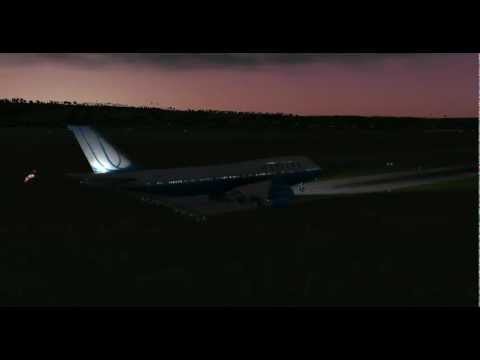
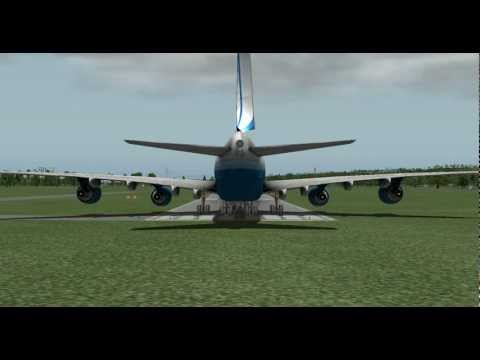
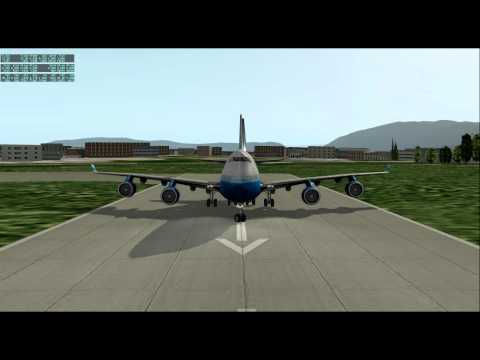
        mais moi ma problème avec le lacet c'est que je n'est pas encore configure mais joystick ni rien toucher dans la configuration de xplan-10 juste après l’installation le lacet ne sarrette pas de bouger un coup a droite un coups ou centre et j'ai fait tous se que j'ai lu sur le forum j'ai formater mon ordinateur de fois pour être sure j'ai également essayer avec et son mon joystick j'ai installer la mis a jour 10.04r1 et vous aller voire dans les photos que le lacet dans une direction et les rous devant son dans une autre direction
        et je n'est pas de palonnier
        aider moi svp

        Cliquez sur l'image pour la voir en taille réelle 

Nom : 		747-400 United_2.jpg 
Affichages :	1 
Taille :		9,7 Ko 
ID : 			454720Cliquez sur l'image pour la voir en taille réelle 

Nom : 		747-400 United_2.jpg 
Affichages :	1 
Taille :		9,7 Ko 
ID : 			454720
        processeur i7260k / asus p8p67pro / radeon hd 7970 /ssd 120 GO vertex3 / watercooling corsair h80 / 12 G de mémoire a 2100Mhz /boitier nzxt phantom /joystick THRUSTMASTER HOTAS WARTHOG

        Commentaire


        • #1
          Lu

          [Mode Hors Sujet]

          La cordonier il ta donner des lacets noir ou marron ...... parske ca change toute .....
          [fermer mode HS]

          guro
          WIN10 Pro x64 (1803) / SSD 1To & 1x 2To pour XP - UC :AMD Phenom II X6 1100T 3,9Gb - Ram: Corsair XMS 16 Go (Kit 2x 8 Go) DDR3 1333Mhz - PC10600 - MB : ASUS M4A89TD PRO/USB3 (AMD 890FX) Crosshair IV Formula ROG - Audio : ROG Xonar Phoebus - LCD : LG 29" & 22" - CG : EVGA GeForce GTX 1080 FTW2 8Gb - TrackIr 5 - Saitek 52Pro - CG Driver : Nvidia 418.91
          XP-9.70 & XP-10.52 - XP-11.26 (No VR) & XP-11.31r1

          Commentaire


          • #1
            Envoyé par takrouni Voir le message
            aider moi svp
            Encore faudrait-il comprendre le problème. Pas facile avec toutes ces fautes.
            Les images jointes n'ont aucun commentaire. Elles sont sensées montrer quelque chose par rapport au problème ?

            Daniel
            Intel I5 6500 3,2 Ghz, RAM 16 Go, GeForce GTX 960 2 Go, Linux Ubuntu 18.04
            Portable Asus Intel i5 2,8 Ghz, RAM 8 Go, GeForce 840M, Windows 8.1 64bits
            #AMD II X2 245 2,9 Ghz, RAM 8 Go, GeForce GTX 650 1 Go, Linux Ubuntu 14.04
            #AMD 64x2 5200 2,6 Ghz, RAM 4 Go, GeForce 9600 GT 512 Mo, Linux Ubuntu 10.04
            #MacBook Pro 15" 2,4 Ghz, RAM 4 Go, GeForce GT 330 M 256 Mo, Mac OS 10.6

            Commentaire


            • #1
              alors j'ai une vidéo qui va mieux explique ma problème vous allez remarquer que les roue devant ne son pas dans la même direction que le lacet la problème est la même avec ou son mon joystick
              processeur i7260k / asus p8p67pro / radeon hd 7970 /ssd 120 GO vertex3 / watercooling corsair h80 / 12 G de mémoire a 2100Mhz /boitier nzxt phantom /joystick THRUSTMASTER HOTAS WARTHOG

              Commentaire


              • #1
                Euh... tout a l'air normal sur ta vidéo, la dérive et les roues sont dans le bon sens (remarque: de jour on verrait mieux)
                Win10 64b / IntelXeon 3.7 GHZ / 8 Go ram / NVIDIA Quadro K2000 2Go
                XPFR

                Commentaire


                • #1
                  Bonjour Beber, là je ne suis pas d'accord, regardes bien à la 22ième seconde, le gouvernail est apleine déflection droite et le train avant est centré. À la 26ième seconde le gouvernail est centré et la roulette de nez pionte directement à gauche. Difficile de rester sur la piste avec une situation semblable...maintenant pourquoi !...en qualité de directeur intérimaire des dynosaures informatique , je passe la main . Bonne chance, André.


                  J'aimerais savoir comment vous allez régler ce problème...........
                  Windows 10 32\64bits service pack 1, Intel Core i7 870"2.93ghz, mémoire 12gb DDR3, Nvidia GTX 760.

                  Commentaire


                  • #1
                    Exact, je n'avais pas regardé en plein écran.
                    Jamais vu ce problème là...
                    Win10 64b / IntelXeon 3.7 GHZ / 8 Go ram / NVIDIA Quadro K2000 2Go
                    XPFR

                    Commentaire


                    • #1
                      Bonjour Beber, simple curiosité, j'ouvre la version 10, installe le 474 de United et voilà, exactement le même problème que mentionné par Takrouni. Étant donné que le pallonier, ou Joystick selon le cas, envoie un seul signal à l'appareil, qui lui, relai le mouvement au gouvernail et au train avant proportionnellement selon la vitesse, je serais porté à croire que le coupable se trouve dans le programme du 474 ( les autres appareils que j'ai vérifiés se comportent normalement au niveau du palonnier). Nous continuons l'enquête Sherlock ?

                      Bon vols...Dr Watson !
                      Windows 10 32\64bits service pack 1, Intel Core i7 870"2.93ghz, mémoire 12gb DDR3, Nvidia GTX 760.

                      Commentaire


                      • #1
                        ah enfin je ne suis pas le seul mais ou contraire de vous poirierandre13506 moi la problème se produits avec tout les appareille et pour le pilot automatique ne marche pas non plus.
                        processeur i7260k / asus p8p67pro / radeon hd 7970 /ssd 120 GO vertex3 / watercooling corsair h80 / 12 G de mémoire a 2100Mhz /boitier nzxt phantom /joystick THRUSTMASTER HOTAS WARTHOG

                        Commentaire


                        • #1
                          Envoyé par poirierandre13506 Voir le message
                          Bonjour Beber, simple curiosité, j'ouvre la version 10, installe le 474 de United
                          Lu

                          J'ai pas trouvé le 474 mais j'ai un 747 United ....

                          Chez moi y a aucun soucis ...

                          @takrouni : Dans ta vidéo tu montres les "Joystick & Equipement" pour les "Axes" et il y en a un qui est rouge et ça c'est pas normal.
                          Je ne dis pas que le soucis vient de là mais c'est surement un problème de configuration dans tes paramètres

                          HD 1080p


                          guro
                          Dernière modification par guro, 12 mars 2012, 18h47.
                          WIN10 Pro x64 (1803) / SSD 1To & 1x 2To pour XP - UC :AMD Phenom II X6 1100T 3,9Gb - Ram: Corsair XMS 16 Go (Kit 2x 8 Go) DDR3 1333Mhz - PC10600 - MB : ASUS M4A89TD PRO/USB3 (AMD 890FX) Crosshair IV Formula ROG - Audio : ROG Xonar Phoebus - LCD : LG 29" & 22" - CG : EVGA GeForce GTX 1080 FTW2 8Gb - TrackIr 5 - Saitek 52Pro - CG Driver : Nvidia 418.91
                          XP-9.70 & XP-10.52 - XP-11.26 (No VR) & XP-11.31r1

                          Commentaire


                          • #1
                            je ne sait pas je n'est pas toucher a rien dans la config toute est par defout
                            si ils a un réglage a faire je veut bien ou bien je peut vous faire une capture d’écran sur toute les fenêtre de de réglage
                            processeur i7260k / asus p8p67pro / radeon hd 7970 /ssd 120 GO vertex3 / watercooling corsair h80 / 12 G de mémoire a 2100Mhz /boitier nzxt phantom /joystick THRUSTMASTER HOTAS WARTHOG

                            Commentaire


                            • #1
                              voila se que le support de x plane ma répandue
                              There are many errors indicated with X-Plane 10 in your system. I recommend the following:

                              1. Be in Administrator Privileges mode on your system before performing the operations below. All known X-Plane 10 components have been removed (or the folder names modified to prevent Installer/Updater conflicts) from your system including out of the Recycle Bin, no X-Plane.exe is running and your system has been freshly rebooted. Firewalls and anti-virus software are turned off. Do the following with no flight controls plugged in.

                              2. Use the new Installer/Updater 3.10 b2 downloaded from http://www.x-plane.com/downloads/x-plane_10_update/ to install X-Plane 10 dvd1 to the Desktop with the no scenery install option selected.

                              3. After installing X-Plane 10 from dvd 1 File>Quit out of the Installer and start up X-Plane by clicking on the X-Plane.exe file found in the main X-Plane 10 folder now installed on the Desktop, run X-Plane briefly to test and then do a File>Quit to quit X-Plane so that a complete log.txt file is created in the X-Plane 10 main folder. Open the X-Plane 10 folder and save a copy of its log.txt to the Desktop calling it "Initial Log.txt".

                              4. Again run the Installer/Updater 3.10 b2 pointing it to the new install to update to version X-Plane 10.04 rc-1 and select the "Include betas" box. After updating to X-Plane 10.04r-1 do a File>Quit of the Updater and open the Installer/Updater folder to find the Updater log.txt and copy that file to the Desktop and save as "Update Log.txt". (It may be on the Desktop already).

                              5. Run X-Plane 10.04 r-1, select File>Quit, open the X-Plane folder again and save a copy of the log.txt file on the Desktop labeled "v1004r1 Log.txt". If you have gotten this far without error messages or crashing you are probably OK and can now add scenery.

                              6. If X-Plane still does not run, take a screen shot of the Rendering Options menu (if possible) and save this screen shot to the Desktop as "Rend Opts". When this is all done attach copies of these three saved log.txt files and the Rendering Options menu screen shot to an email and send the email to info@x-plane.com for analysis.


                              I assume you have installed the driver for your HD 7970 that came out just four days ago? See:

                              Download drivers and software for AMD products — includes Windows and Linux support, auto-detect tools & detailed guides for installation.


                              Please continue to attach the log.txt file found in the main X-Plane folder with each email to help us diagnose issues and track progress with your installation.

                              See attached tips from the user manual for installing/tuning X-Plane 10. A new link has been provided for tips to optimize Windows 7 for better graphics performance.

                              je vais essayer pour voir se que sa donne .
                              processeur i7260k / asus p8p67pro / radeon hd 7970 /ssd 120 GO vertex3 / watercooling corsair h80 / 12 G de mémoire a 2100Mhz /boitier nzxt phantom /joystick THRUSTMASTER HOTAS WARTHOG

                              Commentaire

                              Chargement...
                              X