Annonce

Réduire
Aucune annonce.

Installation Python et Followthegreens

Réduire
X
 
  • Filtre
  • Heure
  • Afficher
Tout nettoyer
nouveaux messages

  • Installation Python et Followthegreens

    Bonjour à tous,

    Suite à une question sur FollowTheGreens, Yves avait répondu :
    « Salut,
    Il faut quand même installer avant XPPython3 pour que ça fonctionne. »

    Pardonnez mon ignorance mais je ne sais pas comment installer "FollowtheGreens".
    J'ai téléchargé la version 3.10 de Python mais je ne sais pas quoi faire ensuite.
    Faut-il mettre ce dossier dans les plugins ?
    Dernière modification par androl2015, 22 octobre 2022, 19h12.
    Jean-François

    x-Plane 12.4.2r2 sous Windows 11 Famille
    Intel Core i7 - 12700K - 3.6 Ghz/25 Mo
    MSI Pro G.Skill F4 3200 C16D - 64Go TRG RGB
    Carte graphique RTX 3080 TI - 12 Go
    Écran Samsung Odyssey G5 32" - 2560x1440
    Écran LG 27" - 1920x1080
    Écran Acer 24" - 1920x1080
    Écran Lenovo 27" - 1920x1080
    Honeycomb Alpha Flight Control
    Throttle Quadrant
    Rudder Pedals
    Joystick : Thrustmaster T-Flight Stick X?
    Thrustmaster A320 Throttle 1 & 2

  • #1
    jfk75

    Salut !
    1. Install 64-bit Python 3.10.x
    1. Extract the xppython*.zip into your X-Plane/Resources/plugins folder, such that you have folder there called XPPython3.
    This plugin XPPython3 folder must be placed in <XP>/Resources/plugins. On first execution, XPPython3 will create the Resources/plugins/PythonPlugins folder.

    You should place any third-party python plugins in that PythonPlugins folder. (On first run of the plugin, XPPython3 will automatically download a set of sample plugins into your Resources/plugins/PythonPlugins/samples folder. To execute a sample, move a plugin up into the PythonPlugins folder.)
    For Mac
    STOP! Before continuing, you need to remove the quarantine. Follow instructions in Mac Quarantine.

    If you forget to do this, XPPython3 will not load and you’ll get error popup indicating XPPython3.xpl cannot be opened. See Common Installation Errors.
    1. Start X-Plane.
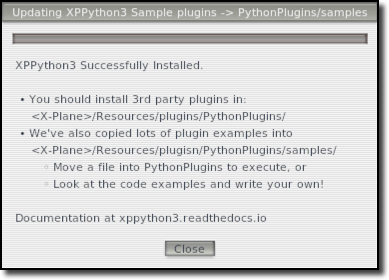
    On installation success, we’ll popup a window:


    Dézippez le fichier de distribution Follow the greens.
    Copiez les fichiers PI_followthegreen.py et PI_showtaxiways.py et le dossier followthegreen dans votre dossier Resources/plugin/PythonPlugins.
    Rechargez les scripts si nécessaire dans XPPython3. "Follow the greens" et "Show taxiways" devraient maintenant être une entrée de menu dans votre menu X-Plane Plugins.
    Sélectionnez-la pour la lancer. Sélectionnez-la à nouveau pour masquer la fenêtre popup.

    La fenêtre de l'interface utilisateur de Follow the greens est conçue pour disparaître après quelques secondes d'inactivité. Sélectionnez Follow the greens dans le menu des plugins pour l'afficher à nouveau.

    Vous pouvez attribuer l'action Follow the greens à une touche ou à un bouton. Cela équivaut à sélectionner l'entrée de menu X-Plane Plugin.

    Translated with DeepL
    XP12.4.4b5 - Zibo.4.05.35 - ZHSI - FDStoXP-Midwest plugin-FSCB737TQ-Sismo OrbitXP-xATC Chatter-XWorldpro-Traffic Global-Navigraph0326
    pc1xp - i9-13900K 4,8 GHz -win11-Asus StrixH Z790-64go ram-rtx4090-ssd-alim 850W-2x77" tv LG4K 7680x2160
    pc2zhsi - i78700K-win11-64go ram-gt730+710-27"+5 lcd mip+2x5"cdu

    B737 OEM sièges cpt-f/o-Ace B737 column yokes - FDS dual mip + 2 cdu - CPFlight mcp/efis/fwd overhead/pedestal - Sismo aft overhead - FSC motorized TQ - palonniers FBC + MFG - B737 tiller Aerosim

    Commentaire


    • #1
      Merci Playrec pour ta réponse, MAIS :
      Lorsque je clique sur le lien de téléchargement, j'obtiens un fichier d'installation .pkg lequel, me donne un dossier Python 3.10.
      Je n'obtiens pas de dossier XPPython3.
      Du coup, je n'ai pas de fichier "Authorize XPL" comme indiqué dans la page qui parle de Quarantine.
      Jean-François

      x-Plane 12.4.2r2 sous Windows 11 Famille
      Intel Core i7 - 12700K - 3.6 Ghz/25 Mo
      MSI Pro G.Skill F4 3200 C16D - 64Go TRG RGB
      Carte graphique RTX 3080 TI - 12 Go
      Écran Samsung Odyssey G5 32" - 2560x1440
      Écran LG 27" - 1920x1080
      Écran Acer 24" - 1920x1080
      Écran Lenovo 27" - 1920x1080
      Honeycomb Alpha Flight Control
      Throttle Quadrant
      Rudder Pedals
      Joystick : Thrustmaster T-Flight Stick X?
      Thrustmaster A320 Throttle 1 & 2

      Commentaire


      • #1
        jfk75

        J'ai mis quelques minutes pour le trouver :
        https://github.com/pbuckner/x-plane_...ppython310.zip
        XP12.4.4b5 - Zibo.4.05.35 - ZHSI - FDStoXP-Midwest plugin-FSCB737TQ-Sismo OrbitXP-xATC Chatter-XWorldpro-Traffic Global-Navigraph0326
        pc1xp - i9-13900K 4,8 GHz -win11-Asus StrixH Z790-64go ram-rtx4090-ssd-alim 850W-2x77" tv LG4K 7680x2160
        pc2zhsi - i78700K-win11-64go ram-gt730+710-27"+5 lcd mip+2x5"cdu

        B737 OEM sièges cpt-f/o-Ace B737 column yokes - FDS dual mip + 2 cdu - CPFlight mcp/efis/fwd overhead/pedestal - Sismo aft overhead - FSC motorized TQ - palonniers FBC + MFG - B737 tiller Aerosim

        Commentaire


        • #1
          Envoyé par playrec Voir le message
          jfk75

          J'ai mis quelques minutes pour le trouver :
          https://github.com/pbuckner/x-plane_...ppython310.zip
          Merci.
          Je viens d'installer comme expliqué. XPPython3 se trouve bien dans le menu Plugins d'x-Plane mais nulle trace de FollowTheGreens.
          C'est normal et, si oui, comment l'utiliser ?
          Dernière modification par jfk75, 18 octobre 2022, 20h09.
          Jean-François

          x-Plane 12.4.2r2 sous Windows 11 Famille
          Intel Core i7 - 12700K - 3.6 Ghz/25 Mo
          MSI Pro G.Skill F4 3200 C16D - 64Go TRG RGB
          Carte graphique RTX 3080 TI - 12 Go
          Écran Samsung Odyssey G5 32" - 2560x1440
          Écran LG 27" - 1920x1080
          Écran Acer 24" - 1920x1080
          Écran Lenovo 27" - 1920x1080
          Honeycomb Alpha Flight Control
          Throttle Quadrant
          Rudder Pedals
          Joystick : Thrustmaster T-Flight Stick X?
          Thrustmaster A320 Throttle 1 & 2

          Commentaire


          • #1
            Peut-être que ça ne fonctionne que sur certains aéroport.
            Essaye de te mettre sur Paris Charles de Gaulle, ou Dubaï.
            PC,i7-9700, RAM 32 Go, GeForce RTX2060 Super, SSD, Windows 10 64bit,
            Xplane 11.50 Vulkan, CH Products Pro Pedals et CH-Flight Sim Yoke

            Commentaire


            • #1
              Lorsque j'ouvre l'article Plugins/XPPython3/Download Samples, j'obtiens le message :
              Python Installation incomplete. See Python3 Log.txt for details.
              Comme je ne comprends pas où se situe le problème, je joins le Log.txt
              XPPython3Log.txt.zip
              Jean-François

              x-Plane 12.4.2r2 sous Windows 11 Famille
              Intel Core i7 - 12700K - 3.6 Ghz/25 Mo
              MSI Pro G.Skill F4 3200 C16D - 64Go TRG RGB
              Carte graphique RTX 3080 TI - 12 Go
              Écran Samsung Odyssey G5 32" - 2560x1440
              Écran LG 27" - 1920x1080
              Écran Acer 24" - 1920x1080
              Écran Lenovo 27" - 1920x1080
              Honeycomb Alpha Flight Control
              Throttle Quadrant
              Rudder Pedals
              Joystick : Thrustmaster T-Flight Stick X?
              Thrustmaster A320 Throttle 1 & 2

              Commentaire


              • #1
                Salut jfk75

                Il faut installer les certificats ssl:

                pip install --upgrade certifi

                ou

                pip3 install --upgrade certifi
                Gentoo Linux x86_64 RYZEN 7900X RTX2070 X-Plane12 & Hackintosh Somona (iGPU intelHD630) IntelCore i7 CPU 7700 @ 3.60GHz X-Plane 11

                Commentaire


                • #1
                  Qui se trouve en ouvrant dans le dossier Python 3 : Cliquez sur l'image pour la voir en taille réelle 

Nom : 		Capture d’écran 2022-10-18 à 22.31.46.png 
Affichages :	455 
Taille :		21,7 Ko 
ID : 			514947

                  "Install Certificates command" (terminal) et pourquoi pas un petit coup de "Update Shell Profile.command"
                  Sarkis
                  Mac Studio M2 Max - 64 Go de mémoire unifiée - SSD de 512 Go​ - Ecran PC LG UltraFine 32 - Saitek X52 Ro&Ro - X-Plane 12

                  Commentaire


                  • #1
                    Bonjour à tous,

                    Suite à l'installation (réussie grâce à votre aide) de XPPython3, au démarrage d'x-Plane, plusieurs fenêtres apparaissent dont certaines sont affichées en permanence.
                    D'où ces questions :

                    1. À quoi servent les fenêtres:
                    a- "x-System" (OpenGL successfully installed), 65A | O Unknown ( ),
                    b- "Click Here" (rien ne se passe lorsque je clique),
                    c- "Hello Wolrd 1"
                    À noter que ces fenêtres peuvent être déplacées ou fermées.

                    2. À quoi servent les fenêtres
                    a- XPPython3 (PythonCameraCallBack1 - F8 to start (j'ai essayé et, effectivement je passe en vue caméra extérieure orientable)
                    b- XPPython3 (de … and 1 jusqu'à … and 9 puis "In message 106, 102, 108, 104, 103, 111)
                    c- Widget Window Test (de "item 0 - val0" à "item 4 - val 4" suivi d'un bouton "Hello Widget")
                    À noter que ces 3 dernières fenêtres ne se ferment ni ne se déplacent.
                    Jean-François

                    x-Plane 12.4.2r2 sous Windows 11 Famille
                    Intel Core i7 - 12700K - 3.6 Ghz/25 Mo
                    MSI Pro G.Skill F4 3200 C16D - 64Go TRG RGB
                    Carte graphique RTX 3080 TI - 12 Go
                    Écran Samsung Odyssey G5 32" - 2560x1440
                    Écran LG 27" - 1920x1080
                    Écran Acer 24" - 1920x1080
                    Écran Lenovo 27" - 1920x1080
                    Honeycomb Alpha Flight Control
                    Throttle Quadrant
                    Rudder Pedals
                    Joystick : Thrustmaster T-Flight Stick X?
                    Thrustmaster A320 Throttle 1 & 2

                    Commentaire


                    • #1
                      Envoyé par Yves Voir le message
                      Peut-être que ça ne fonctionne que sur certains aéroport.
                      Essaye de te mettre sur Paris Charles de Gaulle, ou Dubaï.
                      Bonjour Yves,
                      je viens de positionner mon avion sur LFPG mais je ne vois pas de différence.
                      Mais une question tout de même :
                      Qu'est-ce que ce script est sensé faire ? Je ne vois rien dans la liste des plugins du menu d'x-Plane.
                      Jean-François

                      x-Plane 12.4.2r2 sous Windows 11 Famille
                      Intel Core i7 - 12700K - 3.6 Ghz/25 Mo
                      MSI Pro G.Skill F4 3200 C16D - 64Go TRG RGB
                      Carte graphique RTX 3080 TI - 12 Go
                      Écran Samsung Odyssey G5 32" - 2560x1440
                      Écran LG 27" - 1920x1080
                      Écran Acer 24" - 1920x1080
                      Écran Lenovo 27" - 1920x1080
                      Honeycomb Alpha Flight Control
                      Throttle Quadrant
                      Rudder Pedals
                      Joystick : Thrustmaster T-Flight Stick X?
                      Thrustmaster A320 Throttle 1 & 2

                      Commentaire


                      • #1
                        salut jfk75,
                        J'ai essayé d'installer followthegreens, rien... pas une réaction quelque soit l'aéroport (grand de préférence).
                        Peut-être est-il écrit pour PC ?
                        Faut dire que le mode d'emploi est bien succinct et laisse des zones d'ombre dans l'install.
                        Sarkis
                        Mac Studio M2 Max - 64 Go de mémoire unifiée - SSD de 512 Go​ - Ecran PC LG UltraFine 32 - Saitek X52 Ro&Ro - X-Plane 12

                        Commentaire


                        • #1
                          salut jfk75,
                          J'ai essayé d'installer followthegreens, rien... pas une réaction quelque soit l'aéroport (grand de préférence).
                          Peut-être est-il écrit pour PC ?
                          Faut dire que le mode d'emploi est bien succinct et laisse des zones d'ombre dans l'install. (Fichiers en plus).
                          Sarkis
                          Mac Studio M2 Max - 64 Go de mémoire unifiée - SSD de 512 Go​ - Ecran PC LG UltraFine 32 - Saitek X52 Ro&Ro - X-Plane 12

                          Commentaire


                          • #1
                            Bonjour Sarkis, j'avais compris la première fois ;-)
                            Bon, sans autre réponse, je retirerai l'addon.
                            Jean-François

                            x-Plane 12.4.2r2 sous Windows 11 Famille
                            Intel Core i7 - 12700K - 3.6 Ghz/25 Mo
                            MSI Pro G.Skill F4 3200 C16D - 64Go TRG RGB
                            Carte graphique RTX 3080 TI - 12 Go
                            Écran Samsung Odyssey G5 32" - 2560x1440
                            Écran LG 27" - 1920x1080
                            Écran Acer 24" - 1920x1080
                            Écran Lenovo 27" - 1920x1080
                            Honeycomb Alpha Flight Control
                            Throttle Quadrant
                            Rudder Pedals
                            Joystick : Thrustmaster T-Flight Stick X?
                            Thrustmaster A320 Throttle 1 & 2

                            Commentaire


                            • #1
                              Bonjour,
                              Je sais que Followthegreen dans la vraie vie des aéroports permet de mieux réguler le trafic au sol, d'éviter que l'avion prenne le mauvais taxiway etc.
                              Information for Pilots, Controllers and Airport Operators about "Follow the Greens". Find out what makes it the leading Technology for major Airports.

                              Sinon, concernant l'installation et le mode d'emploi pour Xplane, je ne serais vous aider.
                              Et pour compléter sur le trafic au sol : https://www.parlonsaviation.com/2020...-avec-tristan/
                              PC,i7-9700, RAM 32 Go, GeForce RTX2060 Super, SSD, Windows 10 64bit,
                              Xplane 11.50 Vulkan, CH Products Pro Pedals et CH-Flight Sim Yoke

                              Commentaire

                              Chargement...
                              X