If this is your first visit, be sure to
check out the FAQ by clicking the
link above. You may have to register
before you can post: click the register link above to proceed. To start viewing messages,
select the forum that you want to visit from the selection below.
ExtremeGamer - Windows 10 pro - Intel core I5 440 CPU 3.10GHZ - RAM 16 Go - Processeur x64 - Nvidia GTX 1080 - logitech extreme 3D PRO - Ecran SONY BRAVIA 39'' + écran LG 27''. XP 11
J'ai fait toutes les options possibles:
Sans Ortho4XP, sans la scène EBCI (relicroy), sans "follow terrain"
Ainsi que toutes les alternatives possibles, sans ou avec les uns et les autres, et jamais je n'ai eu un quelconque dénivelé .......
Petite question quel est la version d'XP11 as-tu ?
Gunther
WIN10 Pro x64 (1803) / SSD 1To & 1x 2To pour XP - UC :AMD Phenom II X6 1100T 3,9Gb - Ram: Corsair XMS 16 Go (Kit 2x 8 Go) DDR3 1333Mhz - PC10600 - MB : ASUS M4A89TD PRO/USB3 (AMD 890FX) Crosshair IV Formula ROG - Audio : ROG Xonar Phoebus - LCD : LG 29" & 22" - CG : EVGA GeForce GTX 1080 FTW2 8Gb - TrackIr 5 - Saitek 52Pro - CG Driver : Nvidia 418.91 XP-9.70 & XP-10.52 - XP-11.26 (No VR) &XP-11.31r1
ExtremeGamer - Windows 10 pro - Intel core I5 440 CPU 3.10GHZ - RAM 16 Go - Processeur x64 - Nvidia GTX 1080 - logitech extreme 3D PRO - Ecran SONY BRAVIA 39'' + écran LG 27''. XP 11
Voici l' arborescence de mon custom scenery, est-ce qu'il ne me manque pas quelque chose ?
ExtremeGamer - Windows 10 pro - Intel core I5 440 CPU 3.10GHZ - RAM 16 Go - Processeur x64 - Nvidia GTX 1080 - logitech extreme 3D PRO - Ecran SONY BRAVIA 39'' + écran LG 27''. XP 11
Bonsoir à tous,
J'ai un gros soucis: J'ai créer la tuile +50+004 et tous les aéroports de cette zone sont surélevés. Qui pourrait m'aider ?
Voici ci dessous le Step 1 du processus Ortho4xp (en rouge ce qui m'inquiete)
Downloading airport and water/ground boundary data from Openstreetmap :
Recycling OSM data for way["aeroway"="aerodrome"]
A total of 785 node(s) and 12 way(s).
* EBCF Aérodrome de Cerfontaine
* EBLN Base ULM de Liernu
* EBCI Brussels South Charleroi Airport
* EBBE Beauvechain Air Base
* EBTN Vliegveld Tienen-Goetsenhoven
* EBFS Base aérienne Jean Offenberg de Florennes
* EBML ULM Assesse/Maillen
* EBBR Brussels Airport
* EBMB Brussels Military Airport (BRUMIL)
* LFQJ Aérodrome de Maubeuge-Elesmes
* EBMG Ulmodrome de Matagne la Petite
* EBGB Grimbergen Lint
Recycling OSM data for rel["aeroway"="aerodrome"]
A total of 0 node(s) and 0 relation(s).
Recycling OSM data for way["aeroway"="heliport"]
A total of 7 node(s) and 1 way(s).
* EBSW Sint Pieters Leeuw Heliport
Recycling OSM data for way["natural"="water"]["tidal"!="yes"]
A total of 123462 node(s) and 7512 way(s).
!!!Some OSM errors were detected!!!
They are listed in ..\OSM_data\+50+004\+50+004_way_natural_water_detected_errors.txt
Recycling OSM data for rel["natural"="water"]["tidal"!="yes"]
A total of 9727 node(s) and 169 relation(s).
Recycling OSM data for way["waterway"="riverbank"]
A total of 37764 node(s) and 355 way(s).
Recycling OSM data for rel["waterway"="riverbank"]
A total of 7246 node(s) and 15 relation(s).
Recycling OSM data for way["natural"="coastline"]
A total of 0 node(s) and 0 way(s).
Recycling OSM data for way["waterway"="dock"]
A total of 35 node(s) and 3 way(s).
-> process of the associated data completed : 54873 new nodes.
-> Cutting off of too long edges,
-> Adding patch data for the mesh,
-> Adding of edges related to the orthophoto grid and computation of
their intersections with OSM edges, Removal of obsolete edges,
Removal of obsolete nodes,
-> Transcription of the updated data to the file ..\Tiles\zOrtho4XP_+50+004\Data+50+004.poly
Remain 100787 edges in total.
Dernière modification par fabtrader, 14 août 2017, 22h18.
ExtremeGamer - Windows 10 pro - Intel core I5 440 CPU 3.10GHZ - RAM 16 Go - Processeur x64 - Nvidia GTX 1080 - logitech extreme 3D PRO - Ecran SONY BRAVIA 39'' + écran LG 27''. XP 11
Bonjour
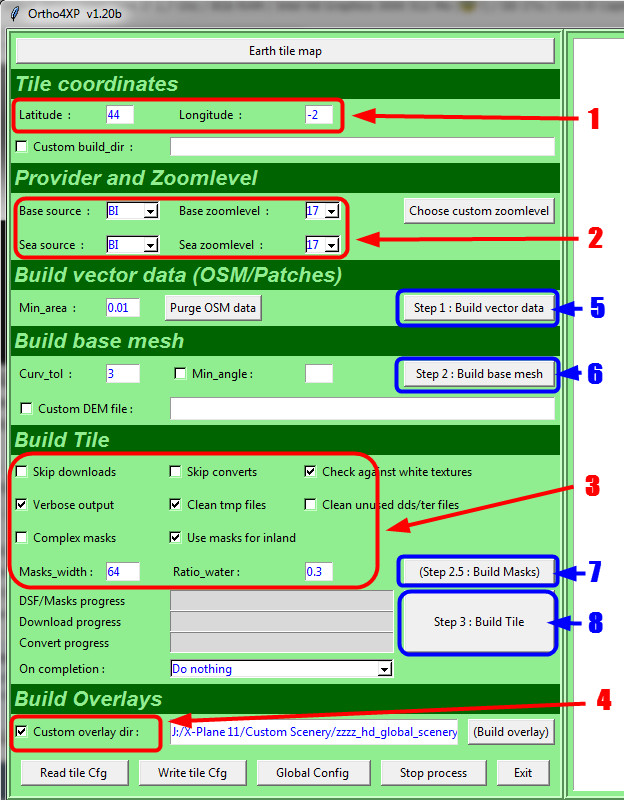
Tu pourrais mettre les réglages que tu mets dans Ortho4XP parce que j'ai l'impression qu'il y a quelque chose qui cloche dans ta façon de faire.
Voici un exemple que j'utilise:
En rouge: "réglages" et "sélection"
En bleu: l’exécution de la procédure, Step1, Step2, etc ....
Gunther
WIN10 Pro x64 (1803) / SSD 1To & 1x 2To pour XP - UC :AMD Phenom II X6 1100T 3,9Gb - Ram: Corsair XMS 16 Go (Kit 2x 8 Go) DDR3 1333Mhz - PC10600 - MB : ASUS M4A89TD PRO/USB3 (AMD 890FX) Crosshair IV Formula ROG - Audio : ROG Xonar Phoebus - LCD : LG 29" & 22" - CG : EVGA GeForce GTX 1080 FTW2 8Gb - TrackIr 5 - Saitek 52Pro - CG Driver : Nvidia 418.91 XP-9.70 & XP-10.52 - XP-11.26 (No VR) &XP-11.31r1
@fabtrader
donc apparemment tu n'as aucun problemes avec l'OSM
post maintenant le Step 2 (le mesh )
et aussi avant de relancer Xplane , efface bien le fichier "scenery_packs.ini" se trouvant dans le dossier Custom_scenery ....
c'est vital pour voir les changements ......
aussi question idiote, as tu bien copié le dossier +50 +004 du dossier "Tile" de Ortho4xp , dans le dossier "Custom Scenery" de xplane ??
si tout les aerodrome (port) ont se probleme de surelevation
c'est probablement du au fait qu'il faut que tu active "les pistes suivent le relief !! "
(sous Xplane 11 je ne sais pas ou se trouve le parametre ... )
@Guro , c'est pas obligatoire de remplir les cases Sea source .... surtout qu'en +50 +004 ya pas la mer :o)
et en zoom 16 la tuile +50+004 passe tres bien ;o)
Dernière modification par Dobro, 15 août 2017, 12h36.
Bonjour Gunther,
Je suis étonné que tu sois le seul à me répondre, merci beaucoup à toi. On est seul sur ce forum.
J'ai construis une tuile sur LFMT et je n'ai pas eu de soucis
Doit-on lancer Python avant la procédure Ortho4 ?
Moi je n'ai pas Global scenery dans custom Scenery. Pour le custom Overlay moi j'ai: D:/X-Plane 11/Global Scenery/X-Plane 11 Global Scenery
Pour le reste cela me semble être la même chose
ExtremeGamer - Windows 10 pro - Intel core I5 440 CPU 3.10GHZ - RAM 16 Go - Processeur x64 - Nvidia GTX 1080 - logitech extreme 3D PRO - Ecran SONY BRAVIA 39'' + écran LG 27''. XP 11
@Guro , c'est pas obligatoire de remplir les cases Sea source .... surtout qu'en +50 +004 y a pas la mer :o)
et en zoom 16 la tuile +50+004 passe très bien ;o)
Bonjour
Oui je sais, c'est pour ça que j'ai dis c'est un exemple.
Concernant le patch +50+004.mesh d'Oscar, j'ai fait les 2 possibilités avec ce patch et sans, dans les deux cas je n'ai pas eu de dénivelé.
C'est pour cela que je pense que dans sa procédure dans Ortho4XP (fabtrader), il y a quelque chose qui cloche .....
Gunther
WIN10 Pro x64 (1803) / SSD 1To & 1x 2To pour XP - UC :AMD Phenom II X6 1100T 3,9Gb - Ram: Corsair XMS 16 Go (Kit 2x 8 Go) DDR3 1333Mhz - PC10600 - MB : ASUS M4A89TD PRO/USB3 (AMD 890FX) Crosshair IV Formula ROG - Audio : ROG Xonar Phoebus - LCD : LG 29" & 22" - CG : EVGA GeForce GTX 1080 FTW2 8Gb - TrackIr 5 - Saitek 52Pro - CG Driver : Nvidia 418.91 XP-9.70 & XP-10.52 - XP-11.26 (No VR) &XP-11.31r1
@Dobro
Bonjour et merci.
Je vais recommencer l'opération pour t'envoyer la step 2. Est-ce que le chemin pour custom ovelay indiqué par Guro est mieux ou je dois utiliser le miens ?
ExtremeGamer - Windows 10 pro - Intel core I5 440 CPU 3.10GHZ - RAM 16 Go - Processeur x64 - Nvidia GTX 1080 - logitech extreme 3D PRO - Ecran SONY BRAVIA 39'' + écran LG 27''. XP 11
Je vais recommencer l'opération pour t'envoyer la step 2. Est-ce que le chemin pour custom ovelay indiqué par Guro est mieux ou je dois utiliser le miens ?
Bonjour
Le chemin du custom overlay ne sert que pour l'Overlay ..... mais n'intervient pas dans la construction de la tuile.
Gunther
PS. Tu pourrais faire un "screen" de tes réglages comme celui que j'ai mis plus haut.
WIN10 Pro x64 (1803) / SSD 1To & 1x 2To pour XP - UC :AMD Phenom II X6 1100T 3,9Gb - Ram: Corsair XMS 16 Go (Kit 2x 8 Go) DDR3 1333Mhz - PC10600 - MB : ASUS M4A89TD PRO/USB3 (AMD 890FX) Crosshair IV Formula ROG - Audio : ROG Xonar Phoebus - LCD : LG 29" & 22" - CG : EVGA GeForce GTX 1080 FTW2 8Gb - TrackIr 5 - Saitek 52Pro - CG Driver : Nvidia 418.91 XP-9.70 & XP-10.52 - XP-11.26 (No VR) &XP-11.31r1
ExtremeGamer - Windows 10 pro - Intel core I5 440 CPU 3.10GHZ - RAM 16 Go - Processeur x64 - Nvidia GTX 1080 - logitech extreme 3D PRO - Ecran SONY BRAVIA 39'' + écran LG 27''. XP 11
ExtremeGamer - Windows 10 pro - Intel core I5 440 CPU 3.10GHZ - RAM 16 Go - Processeur x64 - Nvidia GTX 1080 - logitech extreme 3D PRO - Ecran SONY BRAVIA 39'' + écran LG 27''. XP 11
Voici le step Ortho4:
Step 2 : Building mesh for tile +50+004 :
--------
-> Loading of elevation data.
-> Start of the mesh algorithm Triangle4XP :
Loading altitudes from DEM file.
Computing curvatures from altitudes.
Constructing Delaunay triangulation by divide-and-conquer method.
Recovering segments in Delaunay triangulation.
Spreading regional attributes.
Adding Steiner points to enforce quality.
Computing altitude and normal maps.
Node file ..\Tiles\zOrtho4XP_+50+004\Data+50+004.1.node written to disk.
Tri file ..\Tiles\zOrtho4XP_+50+004\Data+50+004.1.ele written to disk.
Statistics:
Input vertices: 84530
Input segments: 100787
Input holes: 0
Mesh vertices: 427,505
-----------------
Mesh triangles: ---> 846,399 <---
-----------------
Mesh edges: 1273903
Mesh exterior boundary edges: 8609
Mesh interior boundary edges: 194335
Mesh subsegments (constrained edges): 202944
-> Loading of the mesh com****d by Triangle4XP.
-> Flattening of oceans and seas, smoothing of lakes and rivers (1st pass)
-> Flattening of airports and treatment of patches, smoothing (2nd pass).
-> Writing of the final mesh to the file ..\Tiles\zOrtho4XP_+50+004\Data+50+004.mesh
Completed in 22.21sec.
ExtremeGamer - Windows 10 pro - Intel core I5 440 CPU 3.10GHZ - RAM 16 Go - Processeur x64 - Nvidia GTX 1080 - logitech extreme 3D PRO - Ecran SONY BRAVIA 39'' + écran LG 27''. XP 11

 Tweet
Tweet


 surtout qu'en +50 +004 ya pas la mer :o)


Commentaire