
 Tweet
Tweet
Salut ,
après avoir installé une partie de l’Amérique du sud décor de base de x plane , je tente en vain d'installer ce mesh HD qui d’après les photos à l'air superbe .
j'ai suivi tout le processus et malgré cela je ne voit rien de bien différent du décor de base...
j'ai dû ( encore ) raté quelque chose :
par avance , merci
Installation
Please follow these few steps as closely as possible (otherwise you can easily end up with a hosed installation – and might not even notice):
(If you have successfully installed HD Mesh Scenery v2, then you can follow the same procedure for v3. I only recommend, that you use a new Custom Scenery folder for v3 like: zzz_hd_global_scenery3)
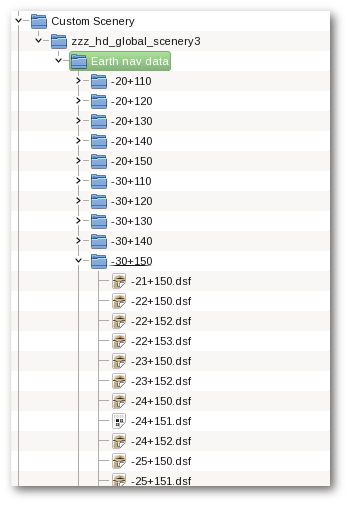
If you are still not sure, how your folder structure should look, it should resemble something like this (this is an example with only some of the packages/regions visible):
How to know if the installation was correct?
After some time, it turns out, that more often than I thought (or hoped), people have a broken installation and do not see/use HD Mesh Scenery (even if they think so). There is a very easy and straight forward way (other than obvious or less obvious visual cues) to check, if X-Plane is really loading the HD Mesh Scenery (and thus, your installation was correct).

le log.txt
Log.zip
après avoir installé une partie de l’Amérique du sud décor de base de x plane , je tente en vain d'installer ce mesh HD qui d’après les photos à l'air superbe .
j'ai suivi tout le processus et malgré cela je ne voit rien de bien différent du décor de base...
j'ai dû ( encore ) raté quelque chose :
par avance , merci

Installation
Please follow these few steps as closely as possible (otherwise you can easily end up with a hosed installation – and might not even notice):
- Create a Subfolder called zzz_hd_global_scenery3 in your Custom Scenery folder (using the zzz_ prefix should highlight, that this package should load at the “bottom” of your scenery list!)
- Create a Subfolder called “Earth nav data” in your zzz_hd_global_scenery3 folder. Here, its very important to name it EXACTLY – without the quotes – “Earth nav data” and don’t make any typos (it is also case sensitive)!
- After you have uncompressed the ZIP file(s), put the resulting scenery folders (they should have names like +50-130,+30-120,+40+010 etc.) in the previously created (sub)folder “zzz_hd_global_scenery3/Earth nav data“!
- Now you can continue with the scenery_packs.ini section if this is your first HD Scenery Mesh v3 package! Otherwise (if you correctly edited the scenery_packs.ini previously) you can now start flying.
(If you have successfully installed HD Mesh Scenery v2, then you can follow the same procedure for v3. I only recommend, that you use a new Custom Scenery folder for v3 like: zzz_hd_global_scenery3)
If you are still not sure, how your folder structure should look, it should resemble something like this (this is an example with only some of the packages/regions visible):
How to know if the installation was correct?
After some time, it turns out, that more often than I thought (or hoped), people have a broken installation and do not see/use HD Mesh Scenery (even if they think so). There is a very easy and straight forward way (other than obvious or less obvious visual cues) to check, if X-Plane is really loading the HD Mesh Scenery (and thus, your installation was correct).
- After a – hopefully – correct installation and correctly setting up scenery_packs.ini (see above) start X-Plane at a location where you have added HD Mesh Scenery coverage (of course, it makes no sense to check where you do not have it)!
- When X-Plane has loaded up your airport and you see the scenery, close X-Plane again cleanly (this makes sure, that really everything has been written to the Log.txt).
- Now open a file browser, go to the root directory where X-Plane is installed and open the file Log.txt (thats where X-Plane logs everything good or bad).
- Search for text like “zzz_hd_global_scenery3” (or the EXACT name you called the installation folder inside “Custom Scenery”).
- If you find multiple lines, which look like “DSF load time: 5869136 for file Custom Scenery/zzz_hd_global_scenery3/Earth nav data/+40-130/+48-123.dsf (635549 tris)” (of course, exact dsf file name, and numbers will vary depending on the place you loaded up) then everything is OK! X-Plane is indeed loading DSF (Scenery) files from you HD Mesh Scenery installtion.
- If you do NOT find any such line mentioning loading HD Mesh Scenery v2 DSFs (with “DSF load time …. for file Custom Scenery/zzz_hd_global_scenery2/Earth nav data/ …”), then something went wrong and you should carefully re-read the installation instructions!
mon custom scenery :
le log.txt
Log.zip

 car c est bien la zone -10-080 que j'ai installée et elle seule ...


 regarde le # 1 c'est exactement ce que j'ai fait

Commentaire