Annonce

Réduire
Aucune annonce.

CG AMD Radeon et HDR Rendering

Réduire
X
 
  • Filtre
  • Heure
  • Afficher
Tout nettoyer
nouveaux messages

  • CG AMD Radeon et HDR Rendering

    Salut à tous,

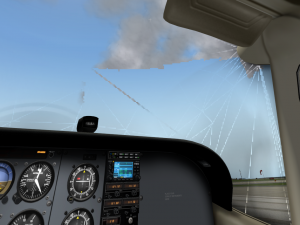
    Depuis que j'avais installé XPlane, il y a environ 2 mois, du crénelage et des bandes apparaissaient autour des nuages lorsque je cochais l'option HDR rendering dans le menu rendu graphique. J'avais essayé 10000 réglages mais rien n'y faisait. Jusqu'à ce qu'il me prenne l'idée de télécharger le nouveau Catalyst Software suite et le dernier driver apparu récemment sur le site AMD. Et Bingo, mon problème de crénelage a disparu. Alors, même si la mise à jour de driver peut paraître tout de même élémentaire, n'hésitez pas à vérifier la version de celui de votre CG, si ça peut vous faire gagner du temps...
    Windows 10 64 bits/ CPU AMD Ryzen 5 3600 6-Core Processor/ GPU Radeon RX 570 Series/ VRAM 8192 MB GDDR5/ RAM 32 GB

  • #1
    Voir ce message de Ben Supnik :
    An update on the state of drivers: AMD’s latest Catalyst Beta (Catalyst 14.2 V1.3) fixes the translucency artifacts in HDR mode.  This driver also supports the newest cards and has correct brightness levels in HDR mode, so if you’re an AMD user on Windows, this is the driver to use.  This change hasn’t made it […]


    Daniel
    Intel I5 6500 3,2 Ghz, RAM 16 Go, GeForce GTX 960 2 Go, Linux Ubuntu 18.04
    Portable Asus Intel i5 2,8 Ghz, RAM 8 Go, GeForce 840M, Windows 8.1 64bits
    #AMD II X2 245 2,9 Ghz, RAM 8 Go, GeForce GTX 650 1 Go, Linux Ubuntu 14.04
    #AMD 64x2 5200 2,6 Ghz, RAM 4 Go, GeForce 9600 GT 512 Mo, Linux Ubuntu 10.04
    #MacBook Pro 15" 2,4 Ghz, RAM 4 Go, GeForce GT 330 M 256 Mo, Mac OS 10.6

    Commentaire


    • #1
      Envoyé par Daniel_L Voir le message
      Voir ce message de Ben Supnik :
      An update on the state of drivers: AMD’s latest Catalyst Beta (Catalyst 14.2 V1.3) fixes the translucency artifacts in HDR mode.  This driver also supports the newest cards and has correct brightness levels in HDR mode, so if you’re an AMD user on Windows, this is the driver to use.  This change hasn’t made it […]


      Daniel
      Ok merci Daniel pour cette précision!!! La prochaine fois, je gagnerai mon temps en exposant mon pb directement sur le forum...
      Windows 10 64 bits/ CPU AMD Ryzen 5 3600 6-Core Processor/ GPU Radeon RX 570 Series/ VRAM 8192 MB GDDR5/ RAM 32 GB

      Commentaire


      • #1
        A noter que la beta 14.2 n'est plus d'actualité, il y a mainetanant une 14.4 non beta.

        PhM
        X-Plane 9.70 & 11.5r1 / W10 / AMD Ryzen 7 2700 / 8Go RAM / Sapphire R9 390 Nitro 8Go / Sapphire HD7870 GHz 2Go / Samsung LN40C530 / Oculus DK2 / LeapMotion / Saitek X56 / Thrustmaster Pendular Rudder

        Commentaire


        • #1
          Les problèmes, il y en a de différents types. Il y a ceux qu'on est les seuls à avoir et il y a ceux que d'autres ont déjà rencontré et peut-être résolu.
          C'est aussi à ça que sert le forum.

          Les drivers ATI, c'est une longue histoire... En voici quelques épisodes :
          Update: this driver bug has since been fixed – see here. If your X-Plane screen looks like this with HDR on, you may be running the new Catalyst 13-12 drivers.  If you can, back up to the Catalyst 13-9 drivers to get back HDR mode. (If you have a really new AMD card, you might […]

          Update: this bug has been fixed – see here for details. For X-Plane users with an AMD graphics* card on Windows or Linux: there appears to be a bug in the 13.11 drivers** that cause corruption in HDR mode; the symptoms are square artifacts of missing clouds and missing windshield in aircraft. If you can […]

          I have spent almost the entire last week looking at ATI performance on Windows in depth; this post summarizes some of my findings and what we are now working on.  Everything on this post applies to ATI hardware on Windows; the ATI Mac driver is a completely separate chunk of code. Forgive me for quoting […]

          A number of users have confirmed that the new ATI Catalyst 9-1 drivers fix the artifacts introduced with the 8-12 drivers!  No need to stay back on the 8-11  drivers any more. It’s nice to have this bug fixed – long time X-Plane users saw this as soon as they updated from 8-11 to 8-12 […]

          What a difference new drivers make. ATI’s latest OpenGL drivers (Catalyst 8.1) seem to work quite well with X-Plane. On two fronts: Linux. Turns out all you need to do to make X-Plane happy on Linux with ATI hardware is update the drivers. I’m running with the Cat 8.1 drivers on my MacBook Pro and […]

          I have spent perhaps the last two weeks tracking down driver-related problems. But the term “driver bug” is heavily overused (blog around and you’ll see that many OpenGL developers get frustrated…) A few examples of the gray areas: Sometimes there will be a bug in application code that shows up only on certain hardware. Drivers […]


          Daniel
          Intel I5 6500 3,2 Ghz, RAM 16 Go, GeForce GTX 960 2 Go, Linux Ubuntu 18.04
          Portable Asus Intel i5 2,8 Ghz, RAM 8 Go, GeForce 840M, Windows 8.1 64bits
          #AMD II X2 245 2,9 Ghz, RAM 8 Go, GeForce GTX 650 1 Go, Linux Ubuntu 14.04
          #AMD 64x2 5200 2,6 Ghz, RAM 4 Go, GeForce 9600 GT 512 Mo, Linux Ubuntu 10.04
          #MacBook Pro 15" 2,4 Ghz, RAM 4 Go, GeForce GT 330 M 256 Mo, Mac OS 10.6

          Commentaire


          • #1
            Envoyé par PhM Voir le message
            A noter que la beta 14.2 n'est plus d'actualité, il y a mainetanant une 14.4 non beta.

            PhM
            C'est bien la 14.4 que j'ai téléchargé.

            Salutations.
            Windows 10 64 bits/ CPU AMD Ryzen 5 3600 6-Core Processor/ GPU Radeon RX 570 Series/ VRAM 8192 MB GDDR5/ RAM 32 GB

            Commentaire

            Chargement...
            X